Describes ParsRAG 1.1.2October 24, 2026
Inside ParsRAG
Everything the current release does, from installing it to reading a cited answer. Each chapter is written from the source code and documents of the release named below.
What ParsRAG is
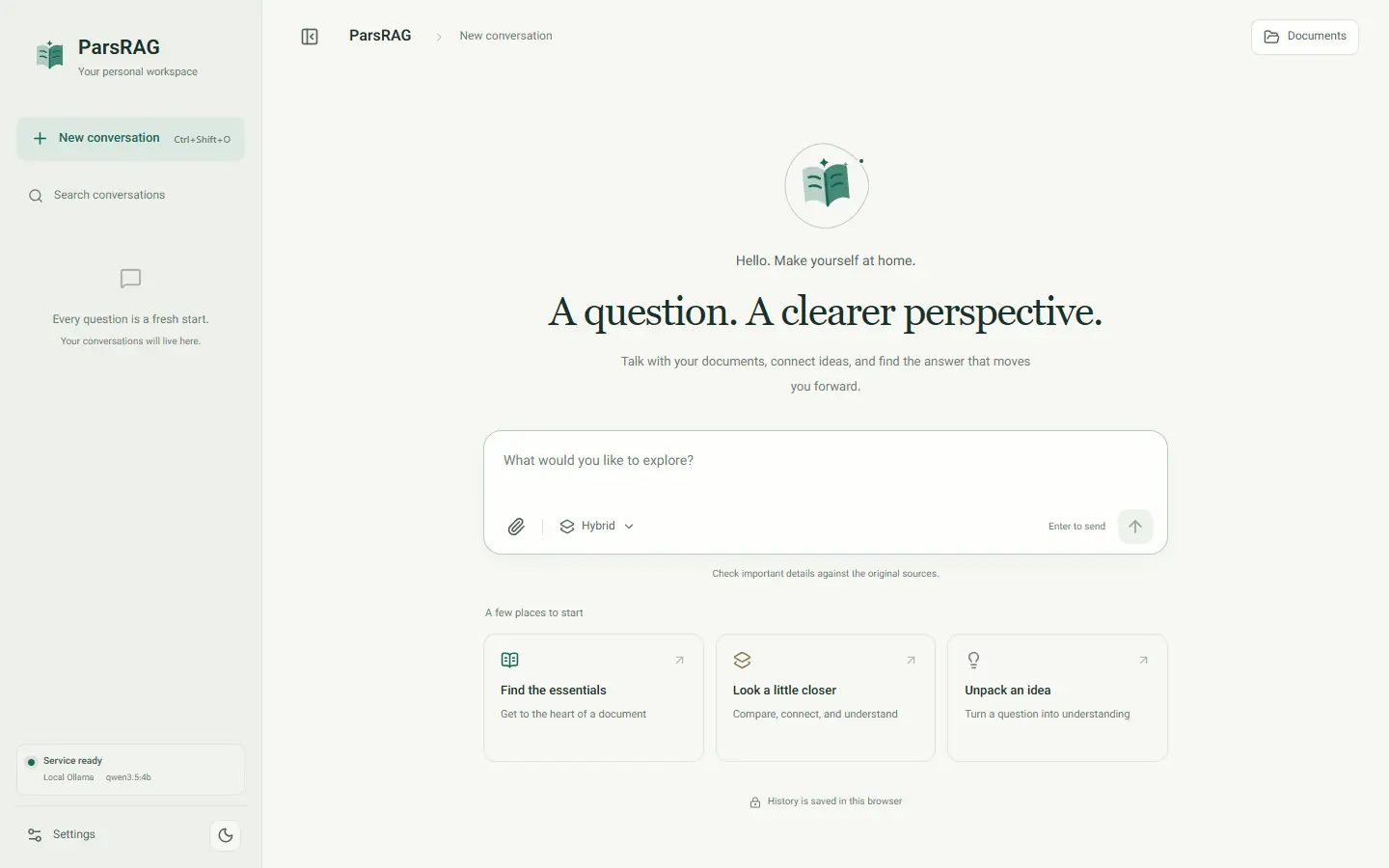
ParsRAG is a bilingual, offline-first workspace for asking questions about Persian and English documents. It reads PDF, Word, PowerPoint, scans, images, text and code, and every answer cites the file and location it came from.
Open as a pageAsk your documents
Upload files to a conversation, then ask in Persian or English. Mention a file with @ to search only that file.
Check every answer
Answers carry numbered citations that open the exact passage, with its page, slide, paragraph, table or image. A passage read from a picture shows the picture too.
Local by design
Reading, OCR, the search index and conversation history stay on your machine. You choose where the answer is written.
Persian first
Right-to-left interface, Persian OCR, Persian spelling normalization and Persian PDF reading order are built in.
The release at a glance
- Version
- 1.1.2, released October 24, 2026
- License
- Source-available, not open source
- Runs on
- Windows, macOS and Linux with Docker Compose; natively with Python 3.12 and Node.js 22
- Backend
- Python, FastAPI, LlamaIndex, Qdrant, sentence-transformers, PyMuPDF, Tesseract OCR
- Frontend
- React 19, TypeScript 7, Vite, KaTeX
- Recommended model setup
- The Ollama already installed on your computer, with its models and GPU; .env.example names qwen2.5:7b
- Settings
- 27 options change in the app without a restart; each can be reset to its .env value
Install and first start
The recommended way to run ParsRAG is Docker Compose with the Ollama already installed on your computer: one app container serves the interface and API, Qdrant stores the vectors, and your own Ollama writes the answers. Ollama inside Docker and API models are the other ways to run it.
Open as a pageWhat you need
The complete setup
The recommended setup uses the Ollama already installed on your computer, with the models you already have and its GPU. The app reaches it at host.docker.internal, so no Compose profile or override file is needed and the app container needs no GPU. On a Mac this is the way to generate on the GPU, because Docker can't pass a Mac's GPU to a container.
- Install Ollama and pull a model. On a GPU with about 6 GB of memory, a 3–4B model runs fully on the GPU.
- Copy .env.example to .env and set LLM_MODEL_NAME to the model you pulled. Its defaults already point the app at the Ollama on this computer: OLLAMA_DOCKER_BASE_URL=http://host.docker.internal:11434.
- Linux only: Ollama listens on 127.0.0.1 by default, where containers can't reach it. Make the Ollama service listen on the Docker bridge address, for example OLLAMA_HOST=172.17.0.1:11434. Windows and macOS need nothing.
- Start ParsRAG, open http://127.0.0.1:8000 (or the port in PARSRAG_PORT), upload documents and ask.
ollama pull qwen2.5:7b
Copy-Item .env.example .env
docker compose up -d --build
ollama ps
On macOS or Linux, copy the settings file with cp .env.example .env. While an answer is being written, ollama ps shows where the model runs; 100% GPU means it runs entirely on the GPU. The port is bound to 127.0.0.1 unless you change PARSRAG_BIND_HOST.
Ollama has no authentication. On Linux, prefer the bridge address: OLLAMA_HOST=0.0.0.0 opens Ollama to every network the computer is on, so if you use it, allow port 11434 only from Docker's networks.
Other ways to run
| Setup | When to use it | How |
|---|---|---|
| Ollama in Docker on CPU | No Ollama on the computer; portable on every system | The local-model profile, with OLLAMA_DOCKER_BASE_URL=http://ollama:11434 and OLLAMA_MODEL in .env |
| NVIDIA GPU | Ollama in Docker with faster embeddings and generation, on Windows or Linux | Add the compose.gpu.yaml overlay |
| Low-VRAM NVIDIA | Cards around 6 GB that can't hold both models | Add compose.gpu-low-vram.yaml: embeddings on CPU, Ollama context 2048 |
| AMD GPU | Supported Linux ROCm hosts | Add compose.amd.yaml (PyTorch 2.6 with ROCm wheels) |
| API model | No suitable local hardware | Set LLM_PROVIDER=api and the endpoint in .env, or switch to it in Settings |
docker compose --profile local-model up -d qdrant ollama
docker compose --profile local-model run --rm ollama-init
docker compose --profile local-model up -d --build app
The first start
- The embedding model (intfloat/multilingual-e5-base) and the Hybrid reranker (about 100 MB) download into the model cache.
- With the computer's own Ollama, ParsRAG never pulls models. With Ollama in Docker, ollama-init pulls the configured model once into its own volume.
- Until everything is ready, /health/ready answers 503 with status preparing, and the interface shows that it is preparing the model and document store.
- If Ollama is off when the app starts, the app still becomes ready. Questions report that the model service is unreachable until Ollama starts, then work without a restart.
- After the first downloads, a local Ollama setup can run offline.
Without Docker
Native development needs Python 3.12, Node.js 22, a running Qdrant, Ollama or an OpenAI-compatible endpoint, and Tesseract with Persian and English data for OCR. Copy .env.example to .env and remove the # from the lines under “Running without Docker” at its end: the Qdrant address, the Ollama URL, the settings file and OCR_ENABLED=1.
py -3.12 -m venv .venv
.\.venv\Scripts\python.exe -m pip install -r requirements-runtime.txt -c requirements.lock
Set-Location frontend
npm ci
npm run build
Set-Location ..
.\.venv\Scripts\python.exe -m uvicorn backend.main:app --host 127.0.0.1 --port 8000
In a native run, OCR stays off until OCR_ENABLED=1 is set; the Docker setup turns it on.
Day-to-day
docker compose ps
docker compose logs -f app
docker compose down
docker compose down keeps your data. docker compose down -v permanently removes vectors, settings saved in the app, caches and the weights of Ollama in Docker.
Connect a model
ParsRAG writes answers with a model you choose. The choice decides where generation happens and what leaves your machine; reading, OCR and search stay local either way.
Open as a page| Provider | Where the answer is written | What leaves ParsRAG |
|---|---|---|
| Local Ollama | This workstation | Nothing through the model adapter |
| Private API | A server you control | Your question and the retrieved excerpts |
| External API | A third-party service | Your question and the retrieved excerpts |
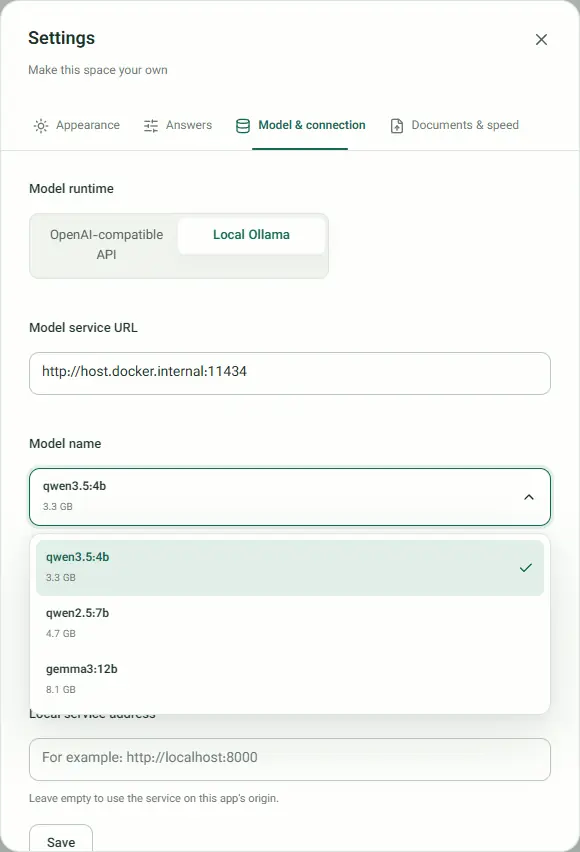
Settings: Model & connection
- Model runtime: OpenAI-compatible API or Local Ollama. A change applies to the next question without a restart.
- For Ollama, the address defaults to http://host.docker.internal:11434, and Find installed models offers the installed models in a menu with their sizes.
- API key: held only in the service's memory, never in the browser or the configuration file. After a restart, enter it again or provide it as an environment variable.
- API privacy boundary: before an external API can be used, you confirm that your question and relevant passages will be sent to it.
- The connection is checked before the non-secret settings are saved. When Ollama fails, Settings says why (the address isn't allowed, or Ollama didn't answer), and when an API is active it offers the server's own Ollama URL.
- Advanced model settings hold the context sizes, thinking, retries and timeouts.
Safety rules for endpoints
- Public API endpoints must use HTTPS; HTTP is allowed only for loopback and private-network addresses.
- Link-local, multicast and reserved addresses are refused.
- Ollama URLs must be plain http://host:port on localhost, 127.0.0.1, ::1, ollama, host.docker.internal or a host listed in OLLAMA_ALLOWED_HOSTS, such as a GPU server on your LAN. Credentials, paths, query strings and HTTPS are rejected.
- Private OpenAI-compatible services can run without a key.
Thinking models and API quirks
- ParsRAG asks Ollama not to think before answering (OLLAMA_THINK=0). Otherwise models such as qwen3, qwen3.5 or deepseek-r1 can spend the whole answer budget on reasoning and return an empty answer. Set OLLAMA_THINK=1 only with a larger OLLAMA_CONTEXT_LENGTH.
- Reasoning that some APIs put inside answers (<thought> or <think> blocks) is removed from answers, streams, conversation titles and suggested questions.
- Temporary API failures (HTTP 5xx and 429) are retried with growing delays, up to MODEL_API_MAX_RETRIES times.
- Google AI Studio works through its OpenAI-compatible endpoint, and the models/ prefix it requires is added automatically. A provider that is out of credit (HTTP 402) is reported as such.
- Model in .env.example
- qwen2.5:7b on the Ollama installed on the computer
- Default API endpoint
- https://openrouter.ai/api/v1
- Answer timeout
- 120 seconds by default; a timed-out API request is retried once
- API retries
- 4 by default, for HTTP 5xx and 429
- Context window
- 8,192 tokens for Ollama, 32,768 for APIs, both configurable
Add documents
Each conversation has its own documents. You add them in the Documents panel, choose which ones answers may use, and can bring in a file already indexed in another conversation.
Open as a pageUpload
- Drop files or choose them. Each file shows three steps: Transfer file, Extract and index, Ready to ask, followed by the number of passages indexed.
- Default capacity: 10 files per conversation, 100 MiB per file, 500 MiB per upload. The interface reads the real limits from the service, and you can change them in Settings → Documents & speed.
- A batch is all or nothing: if one file fails, nothing from that request is left half-indexed.
Supported files
| Family | Extensions | How it is read |
|---|---|---|
| Documents | .pdf .docx .pptx | Structured extraction; OCR for scanned or image-heavy PDF pages and embedded images |
| Images | .png .jpg .jpeg .webp .bmp .tif .tiff | Validated and read with OCR |
| Text and data | .txt .md .markdown .json .csv .tsv .log | UTF-8, UTF-16 with BOM, Windows-1256 (Persian) or Windows-1252; JSON is validated |
| Markup and config | .html .htm .xml .yaml .yml .toml .ini .cfg | Visible text from markup; plain text from config |
| Source code | .py .js .jsx .ts .tsx .css .sql | Text with section metadata |
Checks before reading
- File names must be plain names up to 255 characters, without paths.
- A PDF must really be a PDF, and a Word or PowerPoint file a real Office archive. Password-protected files are named as such.
- Office archives are limited to 10,000 entries, 200 MiB expanded and a compression ratio of 200 per entry.
- A file with the same content as one already in the conversation is recognized and not added twice.
When a file is only partly read
| Notice | Meaning |
|---|---|
| OCR limit | Only the first scanned pages were read (30 by default). |
| OCR image limit | Some images inside a Word or PowerPoint file were skipped (200 by default). |
| OCR partial | OCR couldn't read some pages or images. |
| OCR unavailable | Tesseract isn't installed; text pages were still indexed. |
Managing documents
- Use in answers: tick or clear each document; you can clear every selection.
- From earlier conversations: add an indexed file without uploading it again. The copy becomes independent once it finishes.
- Delete a document with a two-step confirmation; its passages and image previews are removed from the index.
Documents indexed by 1.0.0 keep working. Upload Word and PowerPoint files again to gain image and table citations, image previews next to sources, images past the 30th and better OCR of screenshots.
How documents are read
Before anything can be cited, ParsRAG turns each file into located passages: text with the file name and the page, slide, paragraph, table or image it came from.
Open as a page- Each page becomes its own section, so citations can name the page.
- Persian pages are rebuilt in reading order from glyph positions: right-to-left lines, embedded Latin and digits, mirrored brackets and the ezafe mark on its letter.
- A page goes to OCR when it has no text, when its text layer is garbled, or when it has under 40 characters and contains images.
OCR
- Tesseract with Persian and English data, on grayscale pages rendered at 200 dpi, without contrast stretching.
- A second, single-block pass runs when the first reading is weak (mean confidence below 75), and the more confident reading wins.
- Pages turned 90, 180 or 270 degrees, and pages skewed by 2 degrees or more, are detected and read again.
- Pictures and screenshots also get a sparse-text pass on an enlarged black-and-white copy. It adds text the page layout pass skipped, such as status panels, dark toolbars and text on tinted panels.
- Pictures in Word and PowerPoint are read several at a time (OCR_WORKERS: every CPU core, at most 8, by default), with the same text as reading them one by one.
- Limits: 30 scanned pages per PDF and 200 images per Word or PowerPoint file, 45 seconds per page and 40 million pixels per image by default. Images under 10,000 pixels, such as icons, are skipped.
Word, PowerPoint and other files
- Word: paragraphs are grouped under their headings, up to 180 words, and each passage carries its heading path. Commands and code in one-cell boxes stay with the sentence that introduces them.
- Word tables become Markdown tables with row records, cited by number and the paragraph they follow, for example “paragraph 120 · table 3”.
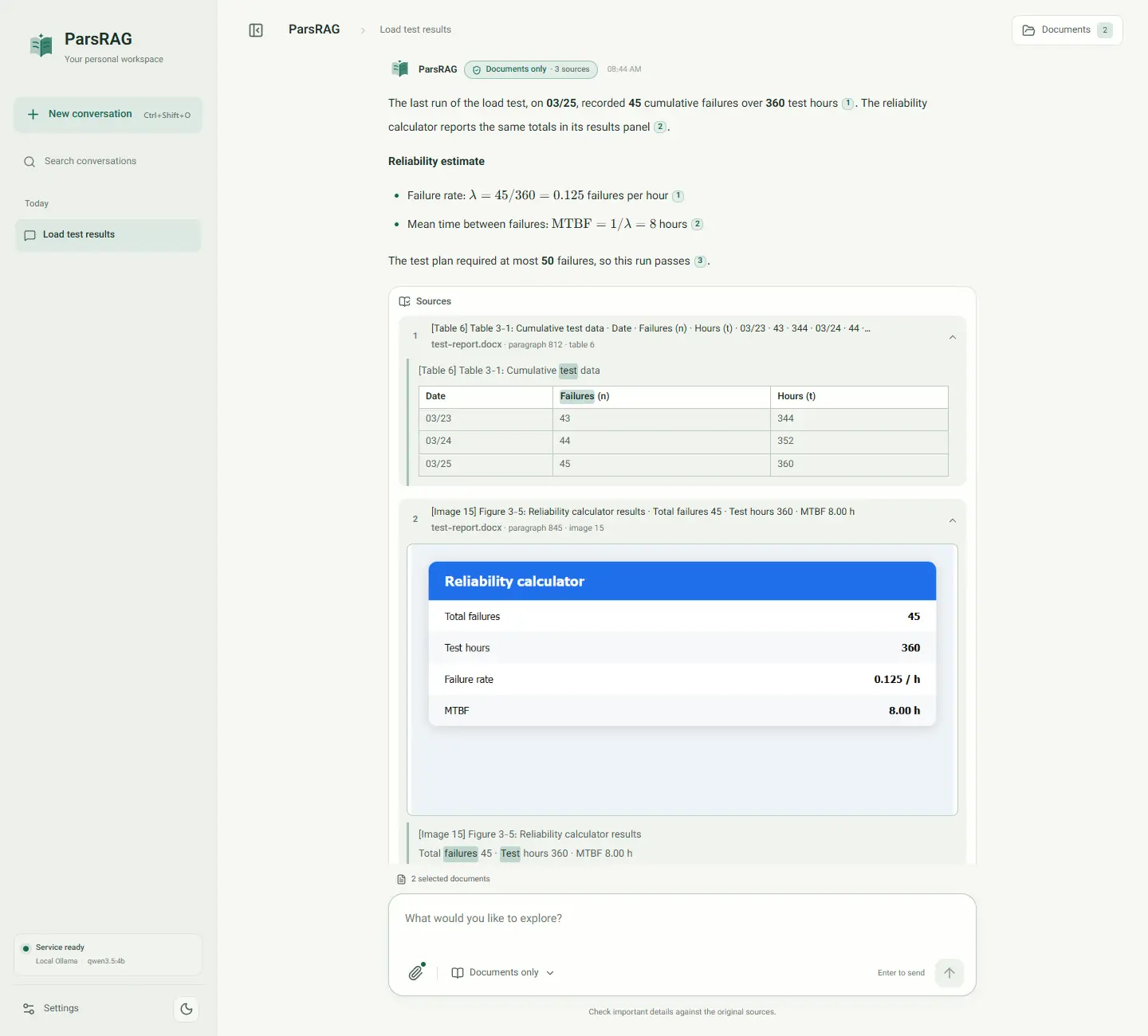
- Images in Word and PowerPoint: the text read from each image is its own passage with the image's caption, cited as “paragraph 120 · image 7” or “slide 25 · image 9”. It also carries the text that introduces the image, and answers say when a fact comes from an image.
- PowerPoint: one section per slide, including its tables.
- HTML and XML keep only visible text; JSON is validated and re-written readably.
Passages
- Text is split into passages of about 512 tokens with a 50-token overlap, and each document is embedded in batches sorted by length.
- For consecutive PDF pages, an extra passage joins the last 90 words of one page with the first 90 of the next, so a fact split by a page turn is cited as a page range.
- Persian spelling is normalized in passages and questions: Arabic Yeh and Kaf, presentation forms, diacritics and digits. The ezafe hamza is kept.
- For every image read with OCR, a WebP copy at most 1280 px wide is kept so the source can show it.
Finding evidence
When you ask, ParsRAG searches only this conversation's documents, by meaning and by keyword, and picks the passages most likely to answer.
Open as a pageTwo kinds of search
- Meaning: each passage has a 768-dimension vector from intfloat/multilingual-e5-base, stored in Qdrant with cosine distance.
- Keywords: a BM25 index (k1 1.2, b 0.75) over the same passages catches exact names, numbers and codes.
- The two rankings are merged with reciprocal rank fusion (k = 60).
- Every search is filtered to the conversation, and to the mentioned file when you use @.
How many passages
- Depth adapts to the question, between 8 and 30 passages: more for summaries, comparisons, lists and tables, fewer for short factual questions.
- With several files, broad questions spread retrieval across them so one large document can't crowd out the rest. Specific questions search all files together, so the file that holds the answer can provide most passages; every other file still contributes its best match, and passages repeated across files are kept once.
- You can fix the number yourself in Settings → Answers, from 1 to 50, or leave it empty so it is chosen per question.
Questions with several parts
- A question that asks several things, such as “which key opens Edit mode, and which fields did the example add?”, is also searched part by part. Each part keeps its best passages, and the model is asked to answer every part and say which one the documents don't cover.
- When part of a table is retrieved, the rest of the table comes with it, so questions about the largest or smallest value see every row.
Per mode
| Mode | Retrieval | Model knowledge | Extra step |
|---|---|---|---|
| Documents only (Strict) | Required | Excluded | Evidence gate before answering |
| Hybrid | Required and reranked | May supplement, marked as such | Arabic-script cross-encoder reranker |
| Open conversation | Skipped | Used directly | None |
The evidence gate
Documents only refuses only when three things are true: the best passage scores below the threshold (0.75 by default, adjustable in Settings → Answers), the question isn't about the whole document, and the passages don't contain enough of the question's distinctive words. With @ mentions, every mentioned file must have its own evidence.
The gate is an application safeguard, not a guarantee. Check important answers against their sources.
Asking questions
The composer is where a question becomes a search: choose a mode, point at files, or start from a question your documents can answer.
Open as a pageThe composer
- Enter sends; Shift+Enter adds a line. Up to 30,000 characters.
- Type @ to mention an indexed document. The question is split into clauses, and each clause is searched in its file.
- Without @, naming a file in the question narrows the search to it, but sharing an ordinary word with a file name no longer does.
- Type / at the start of a line for quick commands.
- While an answer streams, the send button becomes Stop; what was already written is kept.
Quick commands
| Command | What it does |
|---|---|
| /summary | Source-backed summary of the selected documents |
| /compare | Compare the selected documents, citing similarities and differences |
| /translate | Translate text into the interface language |
| /outline | Outline the key points with sources |
| /strict | Switch to Documents only |
| /hybrid | Switch to Documents and model |
| /free | Switch to Open conversation |
| /documents | Open the Documents panel |
| /help | Show the app tour |
Starting points
While it works
The real processing stages appear in order: Understanding the question and conversation, Finding relevant evidence in documents, and Writing the final answer. Then the answer streams in word by word. Every prompt names the answer language, detected from your question, so English questions get English answers in Hybrid and Open conversation too.
Reading an answer
Every answer says where its content came from and lets you open each source.
Open as a pageCitations and sources
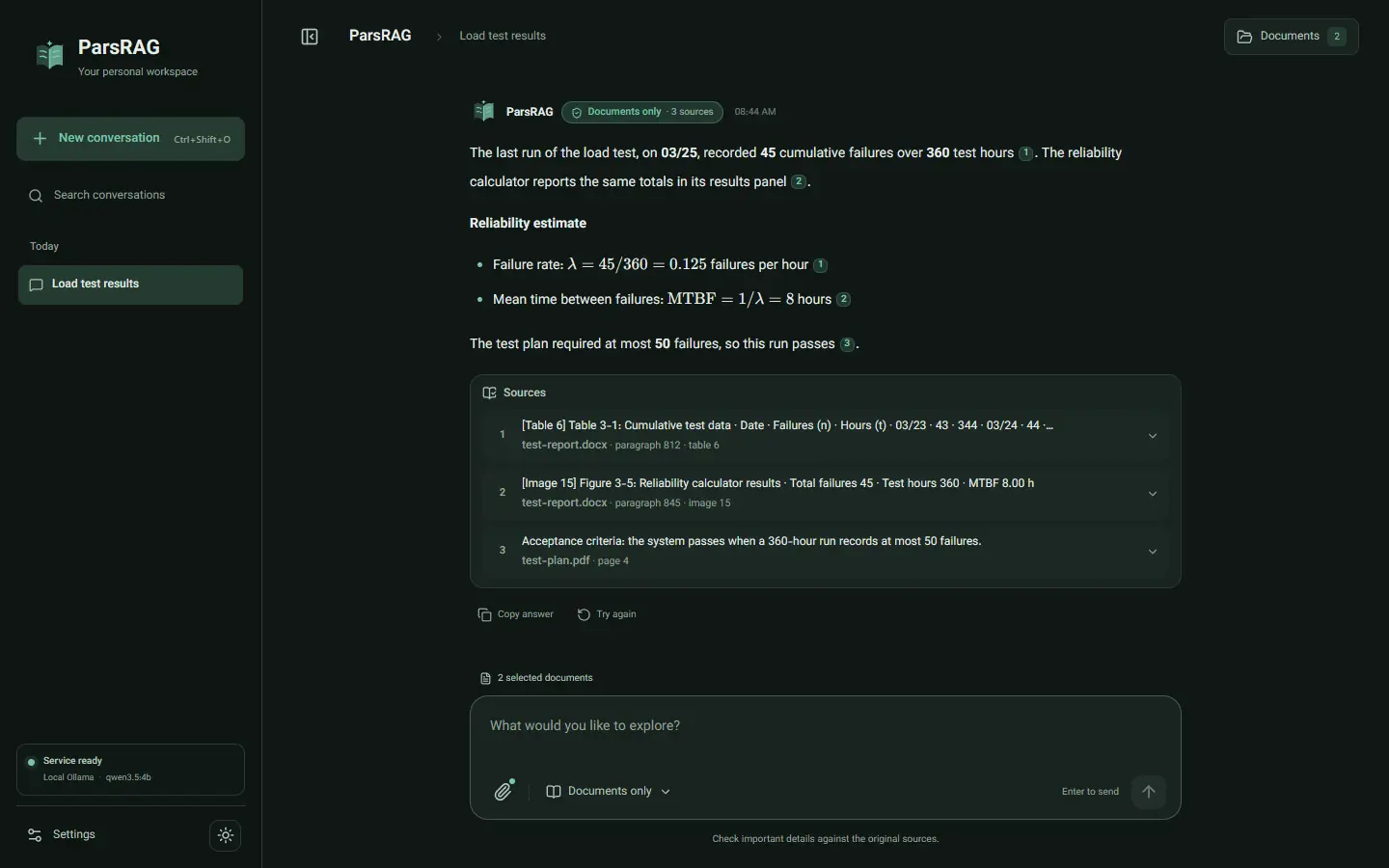
- The model cites passages as [n]; the interface turns them into numbered chips that open the passage.
- The Sources list shows each cited passage with a short preview, file name and location, such as “paragraph 812 · table 6” or “paragraph 845 · image 15”. Expanded, it shows up to 1,600 characters with the question's words highlighted.
- Table passages render as tables, and a passage read from a picture shows the picture itself next to the text.
- Passages that were consulted but not cited fold under “more passages consulted”.
Where the answer came from
| Badge | Shown when |
|---|---|
| Documents only | A Documents only answer |
| Documents + model knowledge | A Hybrid answer |
| Model knowledge | An Open conversation answer |
| Not found in documents | The documents didn't contain an answer |
When there's no answer
| Outcome | Message |
|---|---|
| No documents matched | No relevant passage was found in this conversation's documents. Add a document or ask more specifically. |
| No evidence | The provided documents do not answer this question. Switch to Hybrid mode to let the model add general knowledge. |
| Partial evidence | Not every document you mentioned has enough evidence. Ask about each document separately or check the document names. |
Working with answers
- Copy, Try again, Copy prompt and Edit prompt. Retrying or editing adds a new version you can page through; editing a prompt starts a branch that keeps its own continuation.
- Math is rendered with KaTeX. Persian words are never typeset as math, unclosed delimiters are removed, and the math markup some Gemini models leak into answers is shown as math.
- External images in answers are not loaded.
- Errors are explained by their code, for example a password-protected PDF, a rejected API key, a model that isn't installed or an API account that is out of credit.
Privacy and security
ParsRAG is designed for one person on one workstation. It keeps documents, the index and conversations local, and treats anything that could leave as an explicit choice.
Open as a pageWhat is never stored by the service
- Uploaded files: they exist in memory and a RAM-backed temporary folder only while they are processed. What stays is the extracted text, its vectors and a small copy of each image read with OCR, all in Qdrant; SOURCE_IMAGE_PREVIEWS=0 stops keeping the images.
- Prompts and retrieved excerpts: they are not logged.
- Conversations: they live in your browser's IndexedDB, not on the server.
- API keys: process memory or environment variables only.
Network protections
- Only requests addressed to localhost, 127.0.0.1 or ::1 are accepted, which blocks DNS rebinding. PARSRAG_ALLOWED_HOSTS adds names for LAN use.
- Requests that change data must come from the app's own address or an allowed origin.
- Ollama URLs are limited to loopback, the ollama service, host.docker.internal and hosts listed in OLLAMA_ALLOWED_HOSTS. The browser can't widen this list.
- Settings changed in the app can't touch what guards the trust boundary: ports, allowed hosts and origins, OLLAMA_ALLOWED_HOSTS, the request ceiling, memory limits and model downloads.
- The app listens on 127.0.0.1 by default, and Qdrant sits on an internal network with no outside access.
Container hardening
- Read-only file system, a RAM-backed /tmp, no new privileges and every Linux capability dropped.
- Runs as a non-root user, and pip is removed from the runtime image.
- Memory ceilings: 6 GB for the app, 2 GB for Qdrant and 12 GB for Ollama in Docker by default.
Putting ParsRAG on a shared or untrusted network needs an authenticated reverse proxy. Ollama itself has no authentication, so keep the computer's Ollama off public networks. Vulnerabilities are reported privately through GitHub's security tab.
Your workspace
The interface is a full workspace: conversations, settings, themes and two languages, installable as an app.
Open as a pageConversations
- History is grouped into Today, Yesterday and Earlier, and search looks through titles and message text.
- Each conversation can be renamed, downloaded as Markdown or deleted.
- Back up every conversation and preference to a JSON file and restore it on another machine; documents are uploaded again there.
- Clear all local data removes every conversation and indexed document, and keeps browser data if the service can't confirm the deletion.
Settings
- Four tabs: Appearance, Answers, Model & connection, and Documents & speed.
- Changes to the model, retrieval, uploads, OCR and indexing speed apply while ParsRAG runs, without a restart. Each setting shows its .env value and can be reset to it.
Appearance and language
- Light and dark themes, switched with a circular reveal from where you click.
- Four color palettes: ParsRAG green, Ocean blue, Quiet indigo and Warm sienna.
- Persian is the default language. Switching flips the whole layout between right-to-left and left-to-right, and each answer follows its own language.
- On narrow screens the conversation list becomes a panel you open.
Keyboard shortcuts
| Action | Windows / Linux | macOS |
|---|---|---|
| New conversation | Ctrl+Shift+O | ⌘⇧O |
| Search conversations | Ctrl+Shift+K | ⌘⇧K |
| Open documents | Ctrl+Shift+D | ⌘⇧D |
| Open settings | Ctrl+, | ⌘, |
| Focus the message box | / | / |
| Show the tour | Ctrl+Shift+H | ⌘⇧H |
| Switch light and dark | Ctrl+Shift+Y | ⌘⇧Y |
Guided tour and app install
- A 33-step tour opens on first visit, walks through every control in place, and never changes your settings or data. Replay it any time from Settings → Appearance → Workspace tour.
- Install ParsRAG as an app. The interface opens offline, but answers still need the service; model requests and document data are never cached.
- If something fails while drawing the page, a recovery screen replaces the blank page and your data stays saved.
Architecture
The backend is organized as ports and adapters: the core knows only interfaces, and one composition root connects them to Qdrant, the parsers, OCR and the model clients.
Open as a page| Layer | What lives there |
|---|---|
| Domain | Documents, sections, query modes, upload policy, runtime settings, errors |
| DTOs | Validated requests and typed responses |
| Ports | Repository, parser, chunker, condenser, model gateway, progress, reranker, runtime settings store |
| Use cases | One class per operation: ingest, answer, suggest questions, reuse, delete, configure the model, list Ollama models, change runtime settings, show a cited image… |
| Strategies | Strict, Hybrid and Open conversation pipelines; citations; context budget; Persian normalization |
| Adapters | Qdrant and BM25, LlamaIndex model clients, FlashRank reranker, PDF/Office/OCR parsers |
| API | FastAPI routes, middleware, error mapping and server-sent events |
Compose defines three containers: the app, Qdrant and Ollama, which runs only with the local-model profile. Instead of the Ollama container, the app can use the Ollama installed on the host, reached at host.docker.internal; the host's models and GPU are then used directly. Failures are reported as ollama_url_not_allowed or ollama_unreachable.
HTTP API
| Endpoint | Purpose |
|---|---|
| GET /health/live, /health/ready | Liveness, and readiness once models and Qdrant are available |
| GET /capabilities | Upload limits and supported file types |
| GET, PUT /models/configuration | Read or verify and apply the model connection |
| GET /models/ollama | The installed Ollama models |
| GET, PUT, DELETE /settings/runtime | Read, change or reset the settings changed in the app |
| POST /ingest | Upload and index files |
| POST /query, /query/stream | Answer a question, at once or streamed |
| POST /sessions/{id}/suggestions | Three questions the documents can answer |
| POST /sessions/{id}/files/reuse | Copy an indexed document from another conversation |
| GET /sessions/{id}/images/{n} | The image a cited passage was read from |
| GET, DELETE /sessions/{id}/files | List or delete a conversation's documents |
| DELETE /sessions/{id} | Delete a conversation's index |
A streamed answer
POST /query/stream sends server-sent events in order: stage (understanding, retrieving, generating), sources, token for each piece of text, then done with the full answer, its outcome and the cited passage numbers. Errors arrive as an error event with a stable code.
Every error response has a stable code next to its message, so the interface can explain it in your language.
Quality and releases
Every change runs the same checks in the open, and each release is verified before it is published.
Open as a pageOn every change
- Backend: formatting and lint with Ruff, strict type checking with mypy, and pytest with branch coverage of at least 85 percent.
- Frontend: dependency audit, unit tests, type-checked build, and Playwright browser and app-install tests.
- Both run on Linux, Windows and macOS.
- End to end: real parsing, embeddings, Qdrant, reranking and streaming, with a stand-in model. At least 7 of 8 paraphrased Persian questions must cite their own section first.
- Locally, every backend test runs without skips and without Docker: PARSRAG_E2E=1 runs the end-to-end tests against an in-memory Qdrant unless QDRANT_HOST names a server.
- Packaging: the Docker image is built and the app imported inside it.
Supply chain
- Dependency review on pull requests and a Python vulnerability audit.
- A software bill of materials is generated, and the image is scanned; fixable high or critical findings block the build.
- Dependabot proposes weekly dependency updates.
Measured improvements in 1.0
Measured improvements in 1.1
- Questions with several parts: 5 of the 6 answers that missed a part became complete, with no regressions.
- Pictures read several at a time: a report with 96 images parsed in 33 s instead of 121 s, with identical text. Indexing the whole report went from about 4.5 minutes to about 3.
- Screenshot OCR: facts read from 33 to 37 of 40, for about a third more time per image.
- Thinking models: on a 6 GB GPU with qwen3.5:4b, an empty reply after 59 s became a cited answer in 7 s.
These measurements were made on document sets that aren't published, so they can't be reproduced from the public repository.
Configuration reference
Settings are environment variables in .env, and 27 of them can also be changed in the app's Settings without a restart. These are the ones you are most likely to change; defaults are the Docker values.
Open as a pageIn the app
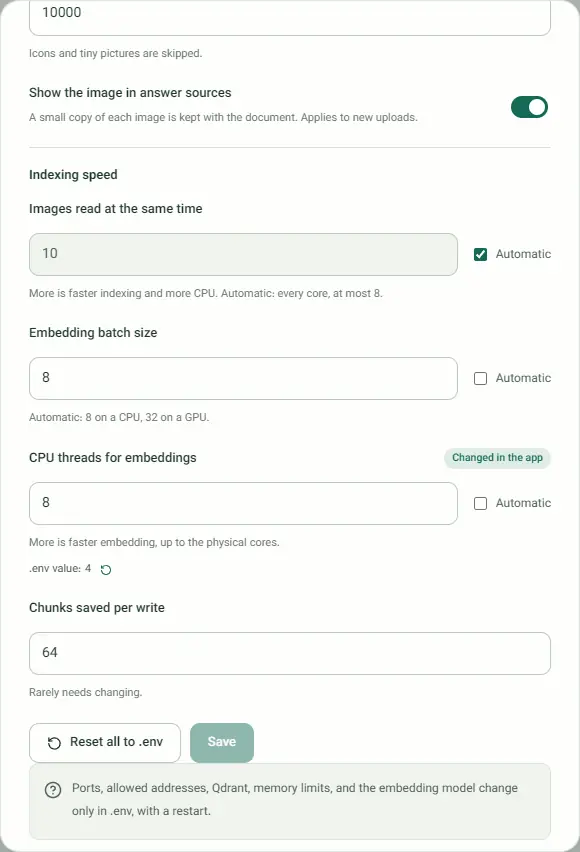
- Settings changes 27 options in four groups: model (context sizes, thinking, retries, timeouts), retrieval (threshold, depths, keyword search), documents (upload limits, OCR, image previews) and indexing speed (OCR workers, CPU threads, batches).
- Each option shows its .env value and can be reset to it, one at a time or with Reset all to .env. Values saved in the app take precedence over .env and survive restarts; they live in the app_config volume.
- Ports, allowed addresses, Qdrant, memory limits, the largest upload request and the embedding model stay in .env and apply after a restart.
- .env.example has only the model choice active. Every other line shows its default, grouped by whether Settings can also change it.
Model
| Variable | Default | Purpose | In the app |
|---|---|---|---|
| LLM_PROVIDER | ollama | ollama or api | Model & connection |
| LLM_MODEL_NAME | qwen2.5:7b in .env.example | Model that writes answers | Model & connection |
| OLLAMA_DOCKER_BASE_URL | http://host.docker.internal:11434 in .env.example | Ollama address as the app container sees it; http://ollama:11434 for Ollama in Docker | Model & connection |
| MODEL_API_BASE_URL | https://openrouter.ai/api/v1 | OpenAI-compatible endpoint | Model & connection |
| MODEL_API_KEY | empty | Runtime secret, never written to disk | Model & connection |
| MODEL_API_DISCLOSURE_ACKNOWLEDGED | 0 | Consent for an external API | Model & connection |
| OLLAMA_CONTEXT_LENGTH | 8192 | Context Ollama allocates per question | Model & connection |
| OLLAMA_THINK | 0 | Let thinking models reason before answering | Model & connection |
| MODEL_CONTEXT_WINDOW | 32768 | Context assumed for API models | Model & connection |
| MODEL_API_MAX_RETRIES | 4 | Retries for HTTP 5xx and 429 | Model & connection |
| LLM_REQUEST_TIMEOUT_SECONDS | 120 | Per-answer timeout | Model & connection |
| OLLAMA_ALLOWED_HOSTS | empty | Extra hosts an Ollama URL may use | .env only |
Search
| Variable | Default | Purpose | In the app |
|---|---|---|---|
| STRICT_RAG_THRESHOLD | 0.75 | Documents only evidence gate | Answers |
| STRICT_RAG_TOP_K | empty | Fixed Documents only depth, 1–50; empty chooses per question | Answers |
| HYBRID_RETRIEVE_TOP_K | 25 | Hybrid candidate pool | Answers |
| KEYWORD_SEARCH | 1 | BM25 fused with vector search | Answers |
| EMBED_MODEL_NAME | intfloat/multilingual-e5-base | Embedding model; changing it means uploading documents again | .env only |
| EMBED_DEVICE | auto | auto, cpu, cuda or mps | .env only |
| RERANK_MODEL | miniReranker_arabic_v1 | Hybrid reranker; none disables it | .env only |
Documents and OCR
| Variable | Default | Purpose | In the app |
|---|---|---|---|
| PARSRAG_MAX_FILES_PER_SESSION | 10 | Files per conversation | Documents & speed |
| PARSRAG_MAX_FILE_BYTES | 104857600 | 100 MiB per file | Documents & speed |
| PARSRAG_MAX_BATCH_BYTES | 524288000 | 500 MiB per upload | Documents & speed |
| OCR_ENABLED | 1 | Turn OCR on or off | Documents & speed |
| OCR_LANGUAGES | fas+eng | Tesseract languages | Documents & speed |
| OCR_DPI | 200 | Rendering resolution for scanned pages | Documents & speed |
| OCR_MAX_PAGES | 30 | Scanned pages read per file | Documents & speed |
| OCR_MAX_IMAGES | 200 | Images read per Word or PowerPoint file | Documents & speed |
| SOURCE_IMAGE_PREVIEWS | 1 | Keep a copy of each image to show next to its source | Documents & speed |
| PARSRAG_MAX_REQUEST_BYTES | 534773760 | Largest upload request; the limits above can't exceed it | .env only |
Indexing speed
| Variable | Default | Purpose | In the app |
|---|---|---|---|
| OCR_WORKERS | empty | Images read at the same time; empty uses every CPU core, at most 8 | Documents & speed |
| PARSRAG_CPU_THREADS | 4 | CPU threads for embeddings, up to the physical cores | Documents & speed |
| EMBED_BATCH_SIZE | 8 | Texts per embedding pass; 32 with the GPU overlay | Documents & speed |
| QDRANT_UPSERT_BATCH_SIZE | 64 | Passages saved per write | Documents & speed |
Service and memory
| Variable | Default | Purpose | In the app |
|---|---|---|---|
| PARSRAG_PORT | 8000 | Port on your machine | .env only |
| PARSRAG_BIND_HOST | 127.0.0.1 | Address the port is bound to | .env only |
| PARSRAG_ALLOWED_HOSTS | empty | Host names accepted besides localhost, 127.0.0.1 and ::1 | .env only |
| PARSRAG_APP_MEMORY_LIMIT | 6g | App container ceiling | .env only |
| QDRANT_MEMORY_LIMIT | 2g | Qdrant ceiling | .env only |
| OLLAMA_MEMORY_LIMIT | 12g | Ollama container ceiling | .env only |
License and citation
ParsRAG is source-available, not open source. You can read the code and run official releases; changing or redistributing it needs permission.
Open as a pageYou may
- Download and copy an unmodified official release.
- Install and run it for personal, academic, research, educational or internal organizational use.
- Read and study the source code.
- Prepare a change only to contribute it back to the official repository.
You may not, without written permission
- Modify it or make derivative works, other than to prepare a contribution.
- Publish, redistribute, sell or rent it, or offer it to others as a hosted or managed service.
- Rebrand it or use the ParsRAG name and mark except to identify an official copy.
Cite it
Publications that use ParsRAG must cite it. The citation in APA and BibTeX is generated from the repository's CITATION.cff.